


How to Build an Enterprise AI Knowledge Base: RAG, Permissions, Data Updates, and Rollout
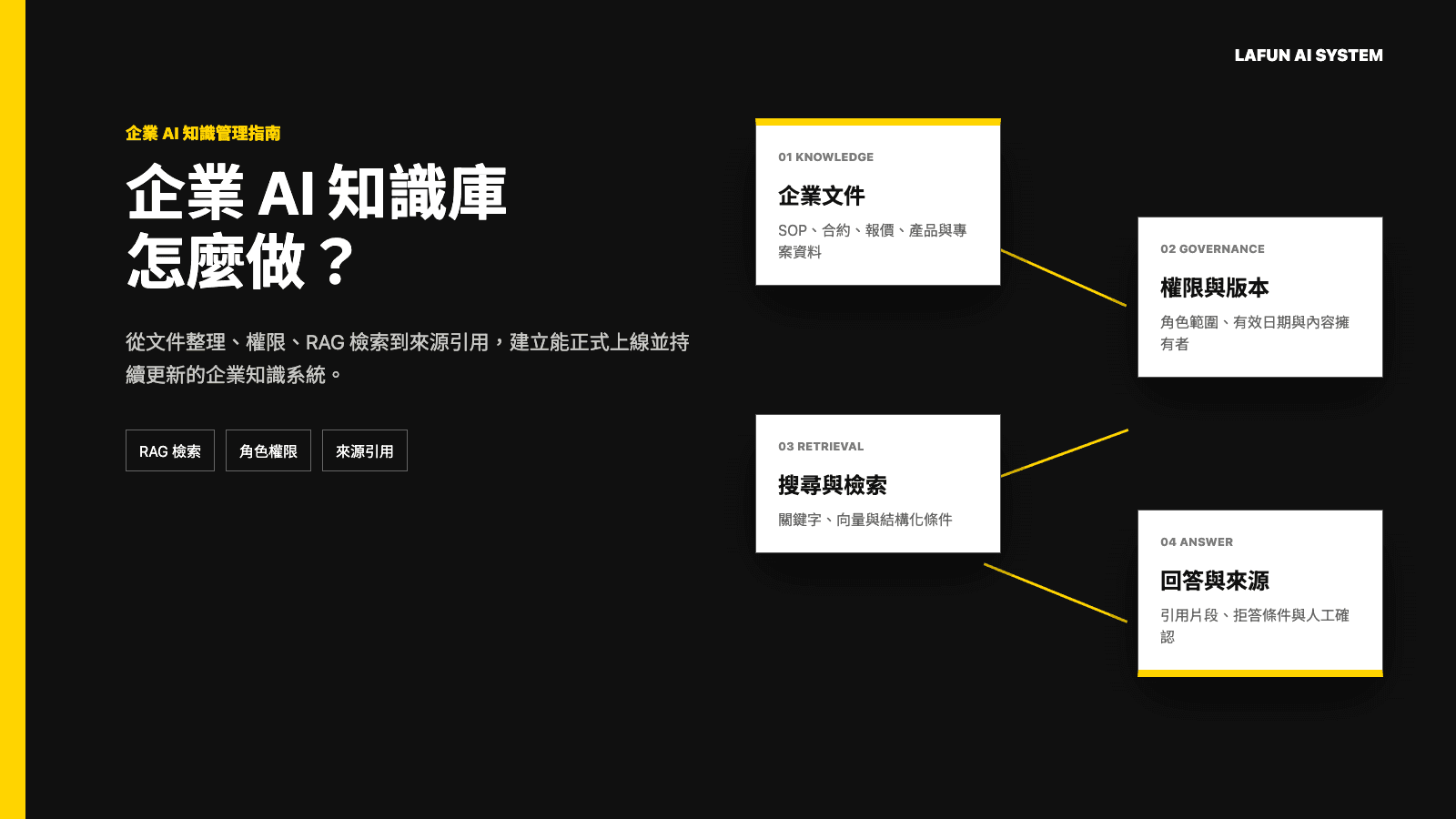
Enterprises accumulate vast amounts of SOPs, contracts, quotes, product documents, and project records, yet employees often have to repeatedly search through folders, emails, chat logs, and various systems when information is needed. The value of an AI knowledge base isn’t just having the model read all documents; it’s enabling users to quickly access answers with sources that can be verified and continuously updated, all under proper permissions.
Conclusion first: Six tasks for enterprise AI knowledge bases
- Where documents come from and who is responsible for content and updates.
- How documents are parsed, segmented, fields are added, and indexes built.
- What data different roles and departments can search.
- How to find relevant segments rather than handing the model all documents at once.
- How answers display sources, handle “no data found” situations, and preserve human verification.
- How to evaluate quality, log usage, and ensure continuous maintenance.
An AI knowledge base is not just uploading files and starting to chat.
General document Q&A tools can quickly validate concepts, but formal enterprise use requires login, role permissions, document versions, validity periods, source citation, deletion synchronization, operation logs, and quality monitoring. If former employees, different departments, or external contractors can access the same content, even if answers are accurate, it is not a deployable enterprise system.
Which scenarios are suitable for pilot implementation?
- Product and customer service knowledge: querying specifications, processes, FAQs, and approved responses.
- Internal policies and SOPs: obtaining the latest operating procedures by department and role.
- Projects and historical cases: searching past requirements, solutions, deliverables, and key notes.
- Quotation and proposal assistance: generating drafts from historical items, conditions, and documents subject to manual review.
- Document comparison and summarization: organizing version differences, meeting highlights, and initial drafts in specified formats.
Organize data responsibilities before starting
Knowledge base quality is usually limited by the original data. If documents are duplicated, expired, or lack owners, AI will only more quickly present this chaos to users. Before building indexes, confirm the owner, validity period, confidentiality level, update methods, and removal rules for each document type.
- List data sources: cloud drives, file servers, databases, CMS, CRM, or internal APIs.
- Assign content owners and reviewers to avoid lack of update responsibility.
- Define access scopes such as public, internal, department, project, and personal.
- Confirm whether personal data, customer information, contracts, and confidential content can enter the model workflow.
- Establish procedures for document updates, expirations, deletions, and corresponding index synchronization.
Complete Architecture of Enterprise AI Knowledge Base
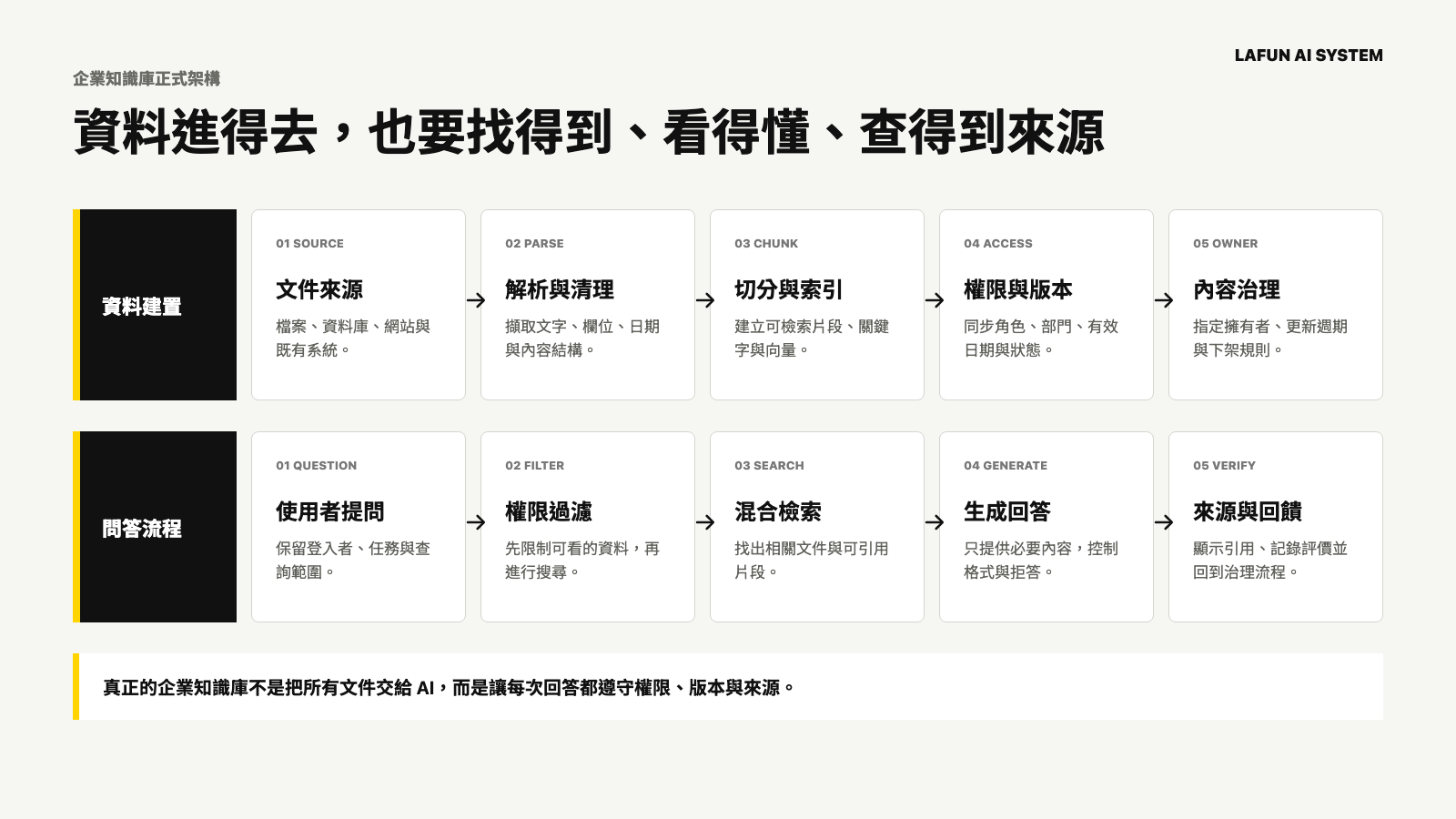
The formal architecture can be divided into two workflows: data construction and Q&A. Data construction is responsible for transforming content into searchable and governable knowledge; the Q&A workflow first verifies user identity and permissions, then searches relevant segments and generates answers. Both require logging, versioning, and quality assessment.
Part 1: Document Parsing, Segmentation, and Indexing
PDFs, Word documents, spreadsheets, web pages, and databases have different structures; you cannot just store file names in the system. After parsing, fields such as title, section, date, client, project, document type, and permissions should be retained, then segmented into semantically and paragraph-wise suitable searchable units. Segments that are too small lose context; too large segments may mix unrelated content.
Part 2: Keyword, Vector, and Hybrid Retrieval
Keyword search fits proper nouns, codes, and exact names; vector search fits when users describe the same concept differently. Enterprise knowledge bases typically use hybrid approaches, then narrow the scope by document type, date, project, and permission filters. Retrieval aims not to find the most content but a small number of reliable segments sufficient to support answers.
Part 3: Permissions Must Be Filtered Before Retrieval
You cannot first search all data and then ask the model to avoid mentioning confidential content. The system should apply the logged-in user’s role, department, project, and document permissions to exclude unauthorized segments during queries. Administrators also need to track permission changes to ensure the index updates synchronously.
Part 4: Answer, Source, and Refusal to Answer
Answers should include document names, segments, or accessible source links so users know the information’s origin. When retrieval results are insufficient, sources conflict, documents are outdated, or users lack permission, the system should clearly state it cannot answer rather than generating fluent but fabricated content.
How to Continuously Update Knowledge?
- Event-driven Sync: update indexes immediately upon document addition, modification, deletion, or permission changes.
- Scheduled Sync: periodically scan data sources, suitable for document libraries with low update frequency.
- Version Management: preserve effective dates and relations to prior versions to avoid retrieving expired content.
- Content Governance: provide statuses such as pending review, published, and archived.
- Failure Handling: enable retry, alert, and log recording when parsing or indexing fails.
How to Test Knowledge Base Quality Before Launch?
Do not only showcase a few successful queries. Collect test questions from real work, including correct answers, expected sources, no-answer cases, insufficient permissions, ambiguous questions, and malicious instructions; separately evaluate if retrieval finds the correct segments, answers are faithful to sources, and the system refuses to answer when appropriate.
- Retrieval Hit Rate: whether the correct sources appear among the top results.
- Answer Accuracy: whether the answer content is supported by cited segments.
- Citation Quality: whether sources correspond to actual answers rather than just related topics.
- Permission Testing: whether different roles can only access authorized content.
- Refusal Performance: whether missing data and sensitive requests are safely handled.
- User Experience: whether response time, source access, and feedback processes are acceptable.
Security and Prompt Injection Cannot Be Ignored
Documents themselves may contain text asking the model to ignore rules, disclose data, or perform actions. Retrieved content must be treated as untrusted input; internal documents must not directly authorize tool operations. The system needs to restrict the model’s available tools, verify outputs, mask sensitive data, and require reconfirmation for critical actions.
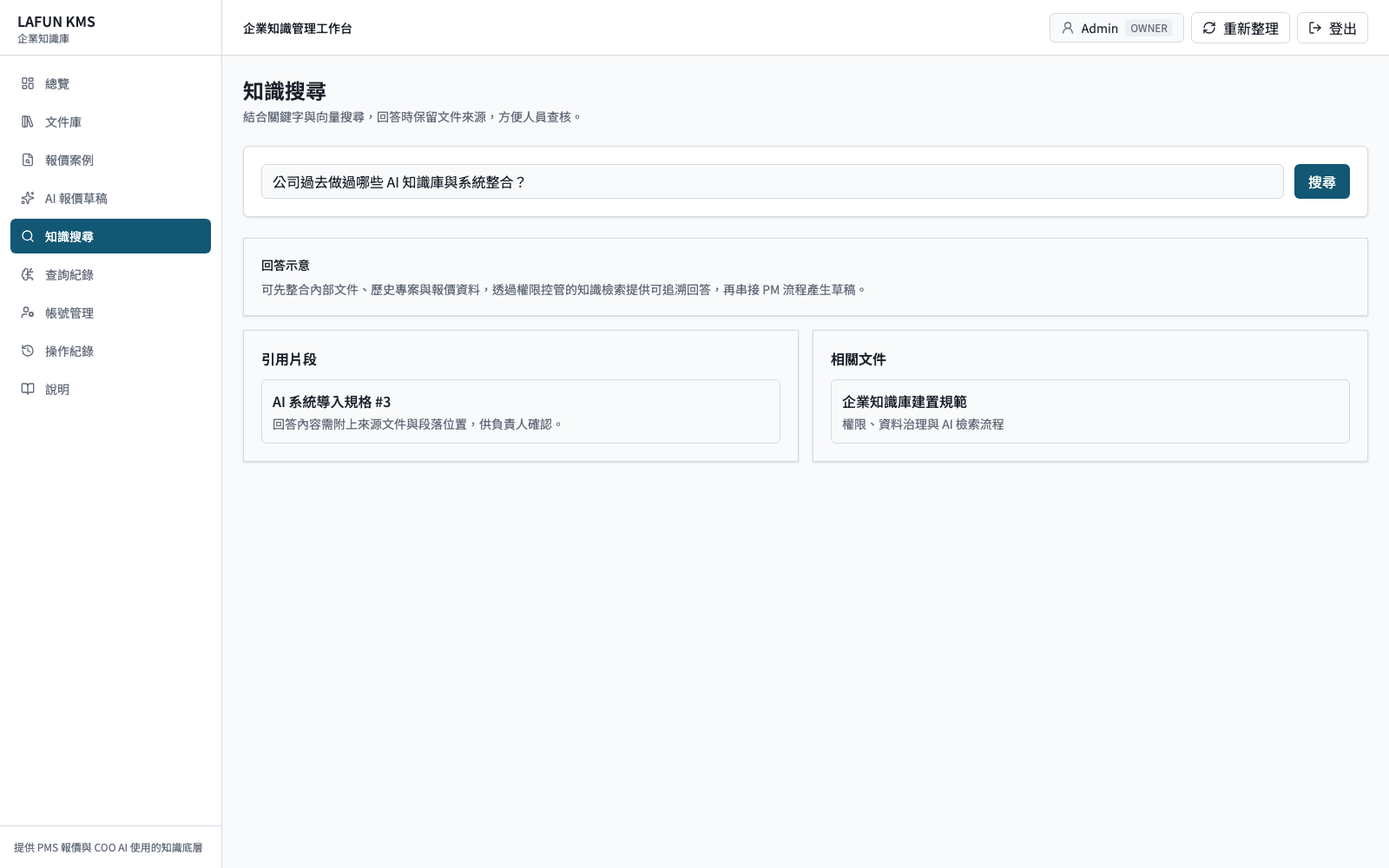
The actual interface should enable users to audit the sources.
Taking the enterprise knowledge search interface as an example, besides the answer area, quoted snippets and related documents should also be displayed. The management side must be able to view query logs, matched sources, user feedback, and failure issues, so content owners know which data need supplementation or correction.
Recommended implementation steps
- Choose a high-frequency, relatively complete, and human-verifiable usage scenario.
- Inventory document sources, owners, permissions, versions, and sensitive content.
- Create a small test set to first validate parsing, retrieval, and citation quality.
- Complete login, permissions, source display, refusal responses, and operation logging.
- Let a small group of users trial the system and collect cases of missing or incorrect answers.
- After establishing updating, monitoring, cost control, and content governance, gradually expand the data scope.
What parts are included in implementation costs?
- Data inventory, cleaning, field and permission design.
- Document parsing, segmentation, indexing, and update pipelines.
- Search, vector database, model API, and computing resources.
- Frontend and backend interfaces, login, permissions, source display, and feedback functions.
- Data evaluation, testing, security, logging, and monitoring.
- Content maintenance, model tuning, user training, and subsequent integration.
Extended references
- Original paper on Retrieval-Augmented Generation
- NIST AI Risk Management Framework
- OWASP Top 10 for LLM Applications
Frequently Asked Questions
Do company documents have to be used to train the model?
Not necessarily. Many knowledge bases use retrieval methods to obtain document snippets with viewing rights only when receiving questions, without retraining the base model. Whether to fine-tune the model depends on the task, data volume, and test results.
Is connecting a cloud drive to AI enough to complete this?
Not yet. A formal system still needs to handle parsing failures, document versions, role permissions, deletion synchronization, source display, quality testing, and operation logging.
Can RAG completely prevent AI from giving incorrect answers?
No. RAG can provide external knowledge and sources but may still retrieve errors, misunderstand snippets, or generate unsupported text, so testing, citation, refusal responses, and human verification are necessary.
Start from a verifiable knowledge task
First select a document category with a clear responsible person, high usage frequency, and the ability to verify correctness. Complete permissions, data sources, and testing processes before gradually expanding the knowledge scope. If you are planning an internal knowledge search, customer service knowledge base, or AI pricing assistance,contact us to discuss data and system architecture.