


From Excel to a Business Management System: Process Mapping, Data Migration, and Rollout
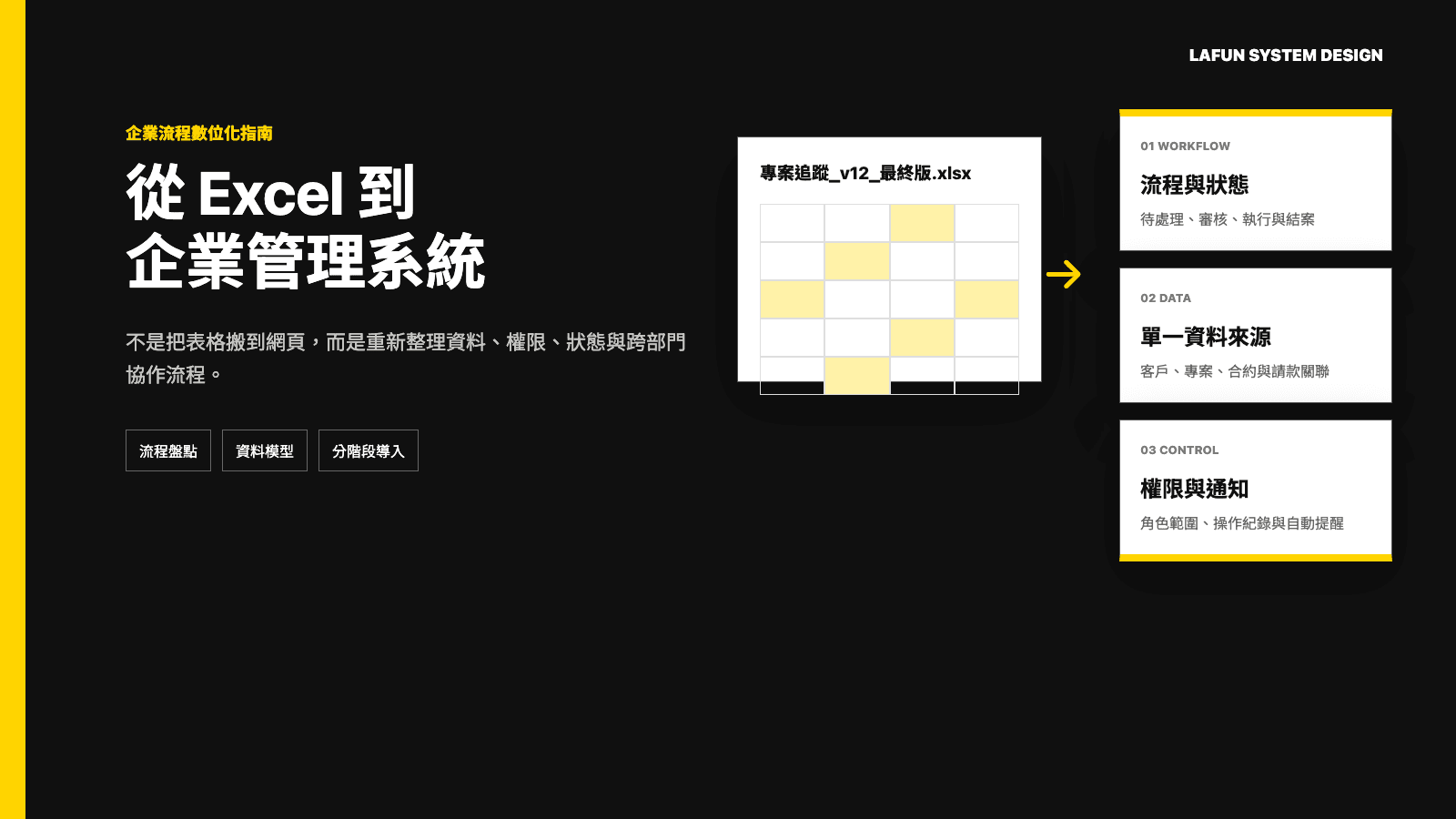
Excel is great for quickly organizing data, calculations, and quick analyses. But when the same sheet requires multiple people to collaborate, cross-department approvals, linking customers and projects, tracking statuses, and maintaining action logs, it takes on responsibilities it wasn't designed for. Transitioning from Excel to an enterprise management system is not about moving columns to a webpage, but reorganizing data, processes, permissions, and management methods.
Consider systematization when these situations occur
- File names include "final version," "final version2," and multiple versions saved individually by different people.
- The same customer or project data is repeatedly entered into multiple spreadsheets.
- Progress can only be assessed using background colors, notes, or group messages.
- When formulas, columns, or sheets are mistakenly altered, it’s difficult to know who modified them and when.
- Different roles need access to different data but can only manage this by splitting files or manually deleting columns.
- Weekly tasks require manual copying, reconciliation, consolidation, and sending reminders.
- Managers cannot instantly see pending tasks, overdue items, amounts, or responsible persons.
Not every Excel file needs replacing
Personal analysis, one-time data preparation, flexible calculations, and small datasets are usually more efficient to handle in Excel. Systematization suits tasks with defined roles, repetitive processes, related data, permission requirements, and long-term tracking needs. Enterprise systems can still support import, export, and report downloads, letting both tools handle the tasks they do best.
The first step isn’t listing features but taking stock of the current situation
Collect all relevant spreadsheets, forms, email templates, and manual steps. Identify who creates data, who supplements it, who approves it, where results are stored, and which fields exist only to work around current tool limitations. Don’t just interview supervisors—also verify how daily operators actually work.
- Each spreadsheet’s purpose, owner, and usage frequency.
- Where data is entered from and where it is copied to.
- Which formulas, macros, colors, and notes represent business rules.
- How cross-department waiting, rejections, document supplements, and exception handling are managed.
- The currently most time-consuming, error-prone, and hardest-to-track tasks.
- Which reports are genuinely used for decision-making and which are routinely produced but rarely used.
Break down spreadsheets into true data models
A single sheet often mixes customers, contacts, projects, quotations, contracts, invoicing, and notes in the same row. After systemization, different data should be separated into clear entities and connected through relationships. For example, a customer can have multiple projects; a project can have multiple quotations and contracts; invoicing must correspond to contracts, bill periods, and accounting statuses.
- Master Data: customers, contacts, employees, products, and suppliers.
- Transaction Data: projects, quotations, contracts, invoicing, invoices, and expenses.
- Process data: status, responsible person, approval, notifications, and deadlines.
- History data: operation records, versions, attachments, and reasons for changes.
- Report data: calculated from official data, no longer relying on manually copied summary tables.
Convert colors and notes into statuses and rules.
Yellow, red, and notes in tables often indicate pending tasks, overdue items, or require supervisor confirmation. The system should turn these implicit rules into explicit statuses, executable actions, and transition conditions. For example, drafts can be edited; after submission for review, only supervisors can approve; reasons must be provided when returning; upon completion, time and operator are recorded automatically.
Permissions are not just about whether a page can be opened.
Enterprise management systems must define which customers, departments, amounts, and fields roles can view, and restrict create, modify, approve, delete, or export actions. Sensitive operations should keep logs to prevent shared accounts or direct database modifications.
Five stages from Excel to system.
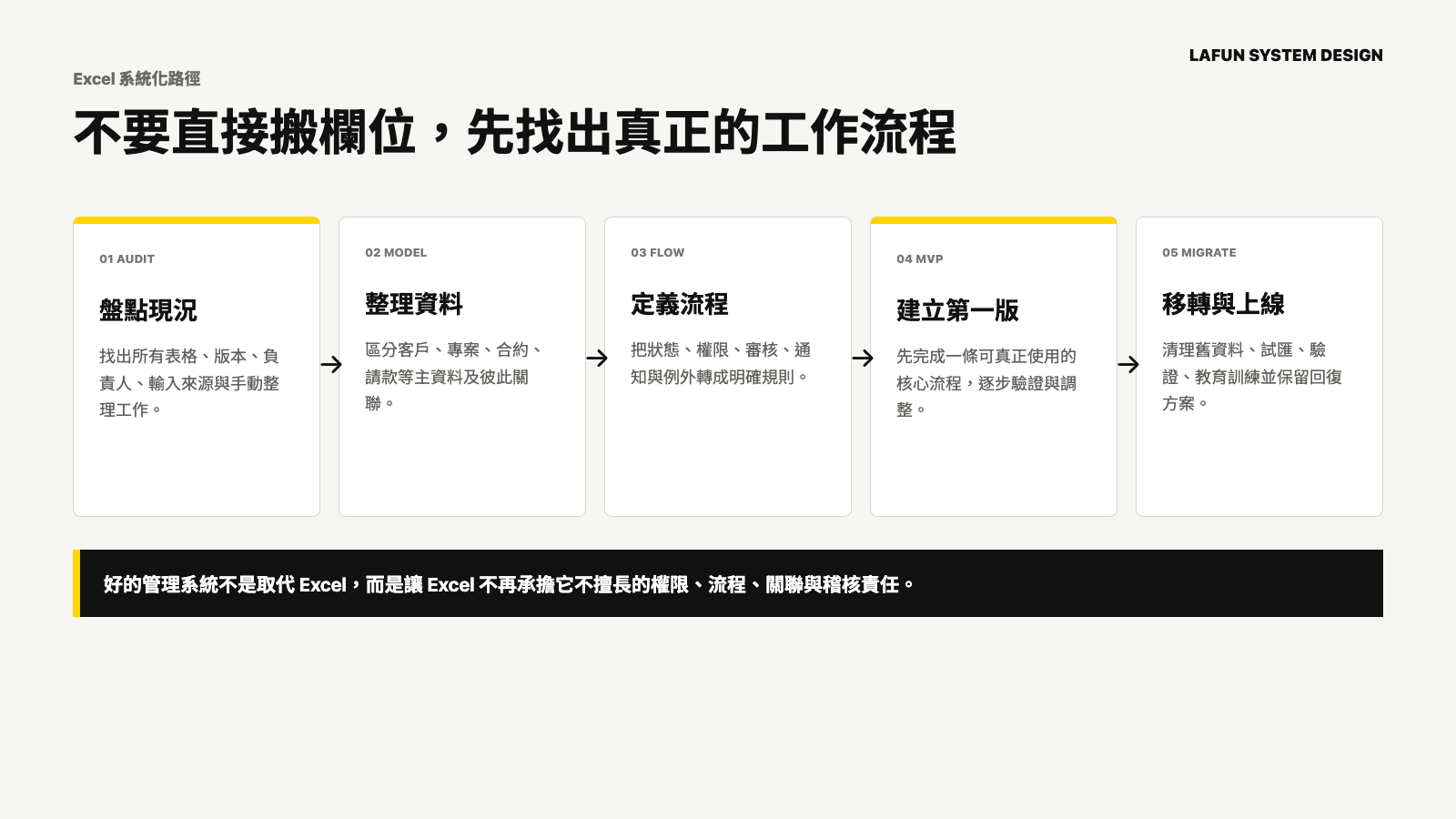
First complete a single workflow, not migrate all tables at once.
The first version should select core processes that are frequent, involve multiple roles, and are measurable for improvement—for example, from capturing customer needs, generating quotations, converting to projects, to tracking invoicing. This workflow must be truly usable, not just implementing small fields in each module and still relying on Excel to complete work.
How to migrate old data?
- Inventory files and versions to determine the official source.
- Create mapping between old and new fields and define format conversion rules.
- Handle duplicate customers, null values, invalid dates, differing codes, and obsolete data.
- Perform test imports to verify record counts, amounts, relationships, attachments, and sample contents.
- Confirm the official switch-over time and whether old tables will cease updating afterward.
- Retain original files, migration records, and necessary rollback methods.
Can Excel and the new system run in parallel?
Parallel use during testing is possible briefly but designate a single official data source; otherwise, updates on both sides create version conflicts. The better approach is to set a switch date where new data goes only into the system; Excel remains read-only for queries or exports from the system.
Notifications, reports, and automation should be based on accurate data.
The system can automatically remind by deadlines, status, and responsible person, and generate to-do lists, overdue items, amount, and progress reports. However, adding extensive automation too early before processes and data stabilize only magnifies errors. First ensure trusted data sources and statuses, then gradually add notifications, scheduling, and cross-system integration.
What costs are considered in implementing enterprise management systems?
- Number of workflows, roles, statuses, and exceptions to cover.
- Complexity of data models, reports, search functionalities, and attachment management.
- Volume, quality, cleaning, and migration methods of old data.
- Email, accounting, CRM, payment, or other third-party integrations.
- Requirements for permissions, audits, information security, performance, and backup.
- UI/UX, mobile operation, training, and launch support.
- Hosting, monitoring, backups, warranty, and ongoing maintenance.
How can the actual management system be modularized?
Taking a project-based enterprise as an example, you can first establish master data for clients and projects, then connect quotations, contracts, service items, billing, invoices, and expenses through the workflow. Each module uses relational fields instead of repeatedly entering client names and project numbers; managers can view related data from the project or track financial status via billing and invoices.
- Clients and contacts: maintain official names, contact persons, and communication history.
- Projects: unified responsible person, duration, status, services, and related documents.
- Quotations and contracts: preserve versions, items, terms, and approval status.
- Billing and invoices: manage periods, expected dates, issuance, and posting status.
- Expenses and reports: consolidate costs, revenues, and pending matters by project.
Common failure modes
- Directly copying all fields without reorganizing data and processes.
- Confirming the interface only with supervisors, neglecting exception scenarios faced by actual operators.
- Including all departments at the start, resulting in an overly broad and untestable scope.
- Underestimating old data cleanup and postponing migration until just before launch.
- Lacking a single decision-maker, leading to continuous rule conflicts during development.
- Allowing everyone to update old forms after launch, resulting in two sets of official data.
- Not assigning system administrators, training, or ongoing maintenance.
Pre-start checklist
- Select the core process that most needs improvement.
- Collect actual Excel files, forms, documents, and notification templates in use.
- List user roles, data scope, and approval responsibilities.
- Confirm master data, transactional data, and their interrelations.
- Organize exception cases, returns, cancellations, overdue items, and document supplement scenarios.
- Decide the scope of the first version, acceptance criteria, and success indicators.
- Early assessment of legacy data quality and migration responsibilities.
- Plan testing, training, transition, and post-launch maintenance.
Frequently asked questions
Should you buy ready-made SaaS or develop a custom system?
When the process closely matches standard functions and has low integration and permission requirements, SaaS can be initially evaluated; if the core process has differences, multi-role permissions, data relationships, or requires connection to existing systems, custom development needs further evaluation.
Is it necessary to migrate all historical data at once?
Not necessarily. The migration scope can be decided based on query and regulatory requirements, such as migrating only ongoing cases and recent data while keeping other files as read-only. However, the query methods and preservation responsibilities for old data must be clearly defined.
How complete should the first version be?
The first version should fully support one real process, including login, permissions, status, necessary reports, and error handling. The module scope can be reduced but should not replace a formal architecture with an unmaintainable prototype.
Further reading
- How to plan custom system development? Requirements, costs, schedule, and vendor selection
- Enterprise AI implementation guide: from process inventory to official system launch
Start by having a single data source for one process
Enterprises don’t need to eliminate all Excel at once. First, select the process with the most repeated input, longest cross-department wait times, or hardest-to-track responsibility. Organize data, roles, statuses, and exceptions, then plan the first-phase system. If you are evaluating project, client, quotation, contract, or billing management, you cancontact us to discuss system scope.